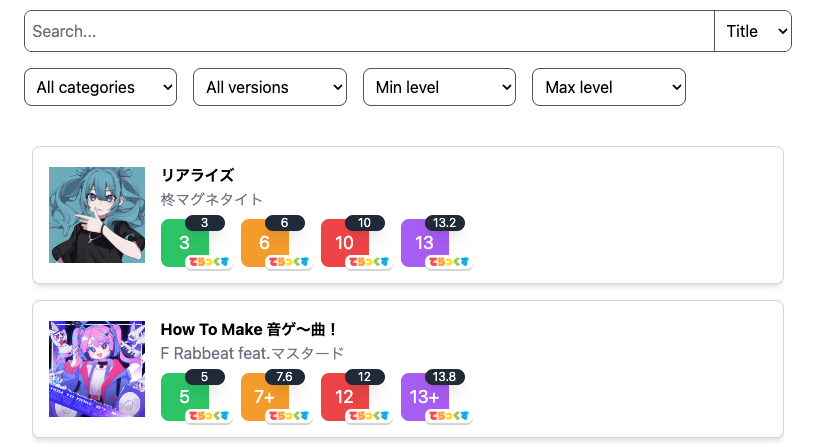
Background
Back when I made MaiFavorite/MaiChart (same project, just different name), I wanted to achieve two things:
- Bookmark favorite charts, using localStorage so that it works without having to store each user’s favorites
- Have an estimated rating calculator for each chart
With the release of BUDDiES PLUS version, the first point is redundant because you can have up to 30 favorite songs, and it will actually show up on the arcade cabinet when you play. The rating calculator seems to be an only me thing, because other people would just use the “Recommended based on rating” category in the arcade cabinet as well. With that in mind, I wanted to remake the website, using a different stack in order to be a learning experience for myself.
Chosen tech stack
There are some things that I wanted to explore, even if it is not the perfect fit for the job. Since this is for exploration only, I want to look for services that are free, and then connect them all together. These are what I used:
MongoDB (database)
I always wanted to explore MongoDB, but ended up using Postgres for my projects. For the sake of experimenting and getting out of my comfort zone, I gathered enough motivation to learn MongoDB by implementing it for this project. Another reason why I used MongoDB is that it has a free tier for proof of concept projects, which is what this project is. If it took off, I will probably just use a VPS to host a MongoDB instance, or just use 1 VPS for everything if the traffic is low.
Next.js (frontend)
I jumped into Next.js without knowing what it is. All I knew was that it is used to make frontend using React. What I should have known is that Next.js requires a server. You can have it create static sites, but it will require you to provide all of the paths in case of dynamic pathing. This was a problem because my path to show song details is /song/{MongoDB's document _id}. I probably could bypass this problem by having the song ID be a query parameter instead, but that is for me to explore in another time.
Either way, Vercel is free and it works, so…
NestJS (backend)
For this project I intend to use render.com’s free server hosting, which only supports these languages:
- Node.js / Bun
- Python 3
- Ruby
- Go
- Rust
- Elixir
- Docker (technically not a language, it accepts a docker image. Haven’t tried it myself though)
In order to make everything use typescript, I went with NestJS. Express is also viable, but it is less opinionated (which some will see as a positive, but for me it is a negative).
Populating the data
SEGA has provided an API that contains all of the songs in maimai, the format looks like this:
{
    "artist": "Lime",
    "catcode": "maimai",
    "dx_lev_bas": "6",
    "dx_lev_adv": "8",
    "dx_lev_exp": "13",
    "dx_lev_mas": "14+",
    "image_url": "511f76bc9e72ec56.png",
    "release": "000000",
    "lev_bas": "6",
    "lev_adv": "8",
    "lev_exp": "12+",
    "lev_mas": "14",
    "sort": "1061",
    "title": "VIIIbit Explorer",
    "title_kana": "VIIIBITEXPLORER",
    "version": "23007"
}
You might be wondering why image_url is not an actual link, and that is because you need to format it like this:
https://maimaidx.jp/maimai-mobile/img/Music/{image_url}
An example can be seen here.

After fetching the data from SEGA, I transformed it a bit to fit my purpose more:
{
    "_id": "679b8e11c1f1fd1898486eae",
    "artist": "Lime",
    "title": "VIIIbit Explorer",
    "version": "FESTiVAL",
    "category": "maimai",
    "cover": "https://maimaidx.jp/maimai-mobile/img/Music/511f76bc9e72ec56.png",
    "difficulties": [
    {
        "difficulty": "BASIC",
        "level": "6",
        "internalLevel": 6,
        "_id": "679f66a643baff684b6438a9"
    },
    {
        "difficulty": "ADVANCED",
        "level": "8",
        "internalLevel": 8,
        "_id": "679f66a643baff684b6438aa"
    },
    {
        "difficulty": "EXPERT",
        "level": "12+",
        "internalLevel": 12.6,
        "_id": "679f66a643baff684b6438ab"
    },
    {
        "difficulty": "MASTER",
        "level": "14",
        "internalLevel": 14.5,
        "_id": "679f66a643baff684b6438ac"
    },
    {
        "difficulty": "BASIC (DX)",
        "level": "6",
        "internalLevel": 6,
        "_id": "679f66a643baff684b6438ad"
    },
    {
        "difficulty": "ADVANCED (DX)",
        "level": "8",
        "internalLevel": 8,
        "_id": "679f66a643baff684b6438ae"
    },
    {
        "difficulty": "EXPERT (DX)",
        "level": "13",
        "internalLevel": 13,
        "_id": "679f66a643baff684b6438af"
    },
    {
        "difficulty": "MASTER (DX)",
        "level": "14+",
        "internalLevel": 14.7,
        "_id": "679f66a643baff684b6438b0"
    }
    ],
    "__v": 0
}
You might be wondering about a few things, such as:
Version string?
From SEGA’s API, the version is just a string of seemingly random numbers. There is a way to know which version a song belongs to. The first three digits can show you the version it belongs. This is the mapping I used:
export const versionMapping = new Map([
  [0, null],
  [100, "maimai"],
  [110, "maimai PLUS"],
  [120, "GreeN"],
  [130, "GreeN PLUS"],
  [140, "ORANGE"],
  [150, "ORANGE PLUS"],
  [160, "PiNK"],
  [170, "PiNK PLUS"],
  [180, "MURASAKi"],
  [185, "MURASAKi PLUS"],
  [190, "MiLK"],
  [195, "MiLK PLUS"],
  [199, "FiNALE"],
  [200, "maimaiでらっくす"],
  [205, "maimaiでらっくす PLUS"],
  [210, "Splash"],
  [215, "Splash PLUS"],
  [220, "UNiVERSE"],
  [225, "UNiVERSE PLUS"],
  [230, "FESTiVAL"],
  [235, "FESTiVAL PLUS"],
  [240, "BUDDiES"],
  [245, "BUDDiES PLUS"],
  [250, "PRiSM"],
]);
Internal level?
SEGA’s API does not give you the internal level / chart constant / 譜面定数, so the community has to manually figure out the exact number. Thankfully, it is compiled by this twitter account into a google spreadsheet.
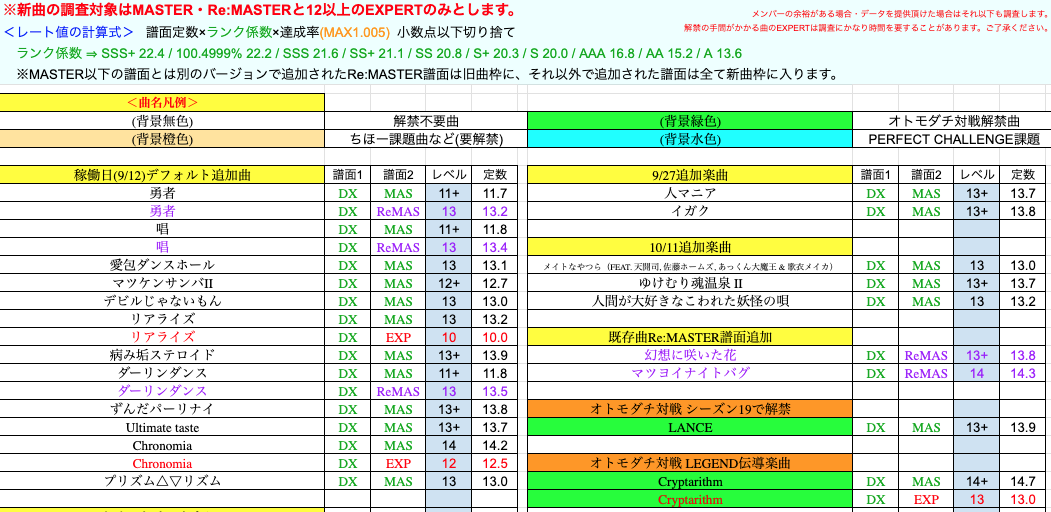
- The first column is the title of the song
- The second column is deluxe or standard (if you noticed, on SEGA’s API there is a
lev_xxxand adx_lev_xxx, that indicates if a chart is standard or deluxe) - The third column is the difficulty type (Expert, Master, Re:Master)
- The fourth column is kind of irrelevant, it is the same data as the one from SEGA’s API
- The fifth column is the value that we want to save to our database
To get the data programmatically, I used the google-spreadsheet package from Node.
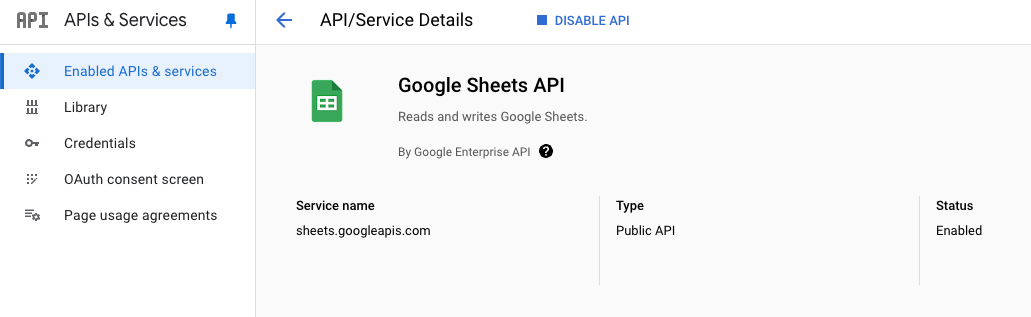 The package requires you to create a Google Cloud Project (which is free), enable the Google Sheets API, and create a service account or API key.
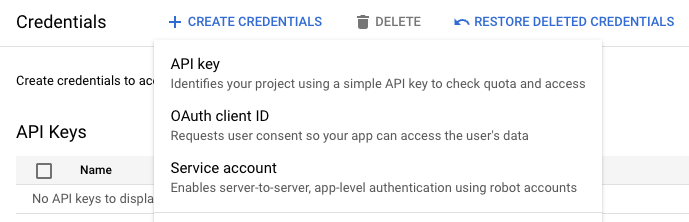 It is a matter of preference, but I like using service accounts because it uses a separate robot account to load the spreadsheet.
Rating calculator
The rating calculator is actually simple, this is the formula:

In short, you multiply your score (maimai’s score range is 0-101), divide it by 100, multiply by the internal level, and multiply by the rank factor. The rank factor is a factor that is decided by your score. It looks like this:
- 100.5 - 101: SSS+ (22.4)
- 100 - 100.4999: SSS (22.2 for 100.4999, else 21.6)
- 99.5 - 99.9999: SS+ (21.1)
- 99 - 99.4999: SS (20.8)
- 98 - 98.9999: S+ (20.3)
- 97 - 97.9999: S (20)
- 94 - 96.9999: AAA (16.8)
- 90 - 93.9999: AA (15.2)
- 80 - 89.9999: A (13.6)
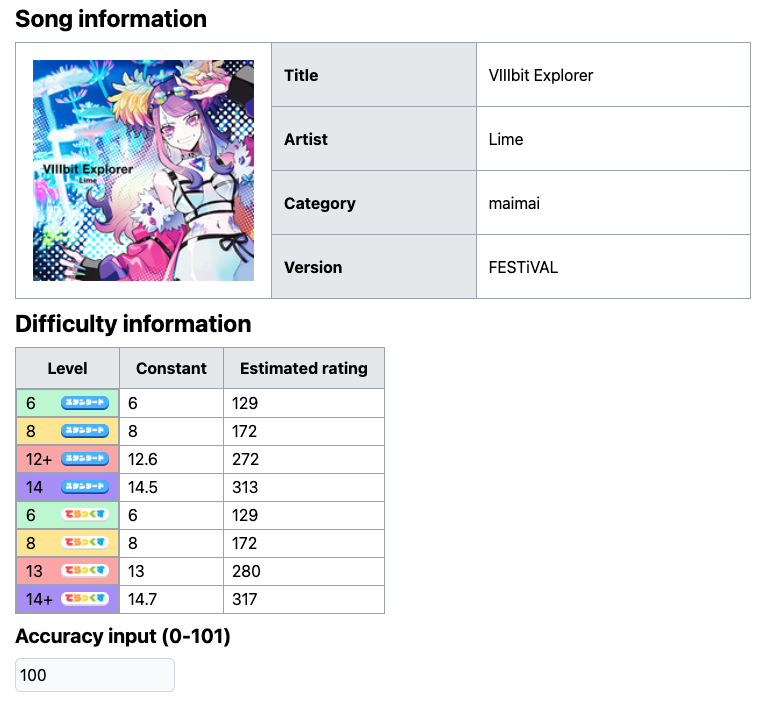
My site will automatically calculate it based on the user’s input. I think using useState is a bit overkill, so I might try to find a different way to achieve that.
What’s next
The current code can be seen here, and the website is up here.
Despite the name, there is no social media element in my project, yet. I plan to add a “sign in with google” using Supabase, and I want to add a comment section on each song.
Other than that, it would be great if I can somehow get the current user’s rating. I still don’t know how people do it, but there are some online tools to get your rating breakdown, such as maichart and mai-tools.
I haven’t started working on the social aspect, so I will work on that & post a part 2 when it is done.